If you are having trouble viewing this e-mail, Click Here |
 |
    |
Business Email - Launching on 2nd
February
As announced in our previous email we had deferred the launch of Business Email based on feedback we received from you. We are pleased to inform you that Business Email will now go live on 2nd February, 2015. Please refer to this email for important information about moving from Personal Email to Business Email and the revised migration timelines for various processes associated with this launch.
Moving from Personal Email to Business Email
-
With the product now going live on 2nd February, 2015, here is how the migration timelines will be impacted.
- What happens to existing Personal Email Packages under my account?
Please refer to the table below for timelines for various processes associated with Personal Email packages under your account.
- I don't want to continue with Personal Email. What should I do?
If you chose not to continue with our Personal Email, we would strongly recommend that you take a back up of all your emails and inform your customers to do so as well before the 30th of May. After this date, you will no longer be able to download your emails as they will be deleted from the server. - What are the next steps I should take?
- We would strongly recommend that you set your selling status for Personal Email Plans in your Control Panel to 'No New Orders', to ensure that your customers will not need to switch across products. On 2nd February, your selling status for Personal Email plans will automatically change to "No New Orders". Please use the following path to change your selling status:
Login to your Control Panel > Settings > Manage Products and Pricing > Web Services > Email Only Plans - If you have opted in for 'Automatic Sign up for New Products', all you need to do is login to your Control Panel on the 2nd February, 2015 and set your preferred selling price. If you have disabled this option, you will need to login and manually change your status to 'selling' for Business Email on the 2nd February, 2015.
Login to your Control Panel > Settings > Manage Products and Pricing > Business Email
- If you wish to continue using Business Email, you do not need to download emails as all your data will be ported over to the new interface.
- Use this White Labeled Customer Email to inform your customers about these changes right away. You can send this email to your customers through the Control Panel using the following path:
Login to your Control Panel > Customers > Send Mail
- We would strongly recommend that you set your selling status for Personal Email Plans in your Control Panel to 'No New Orders', to ensure that your customers will not need to switch across products. On 2nd February, your selling status for Personal Email plans will automatically change to "No New Orders". Please use the following path to change your selling status:
- If I currently have 100 email accounts on a Personal Email package but only use 20 of them actively, will I be billed for 100 accounts upon migration?
Yes, please delete any email accounts that may have been created for testing or one-time-use purposes that you will not be using any more, as billing will move to a per account basis and you will be charged for it. - That answers most of my questions, but I still have some doubts.
Refer to our detailed FAQ Document for all the information you need about moving to Business Email.
| Date | Process |
| 2nd February, 2015 | Business Email, with 5 GB space per account, will go live and the billing cycle for new packages will change to a per account billing model. You will be able to renew your Existing Personal Email packages at the current prices for a tenure of 3 months, if they are due for renewal before 30th March. |
| Between 2nd February - 30th April, 2015 | Existing Personal Email packages for all packages in active status or in Deletion Grace Period as on 30th March 2015 will be migrated to the new OX 7 platform and the package expiry date will be set to 30th April 2015. If your concerned Personal Email package is expiring beyond the 30th of April, 2015, then pro-rata refund will be processed for you.
If you wish to continue using this email service, all you have to do is renew the concerned package after completion of migration to Business Email (This will be renewed based on the new billing model which is on a per account basis). |
| Between 30th April, 2015 - 30th May, 2015 | If your order wasn't renewed before this date, your order will be suspended and you no longer will be able to send/receive emails. However, you will be able to renew the concerned order and resume all services as per the new billing model. |
| After 30th May 2015 | All orders that were not renewed will be deleted from the server and you will no longer be able to renew/resume the email services. |
Business Email - Why you should offer it
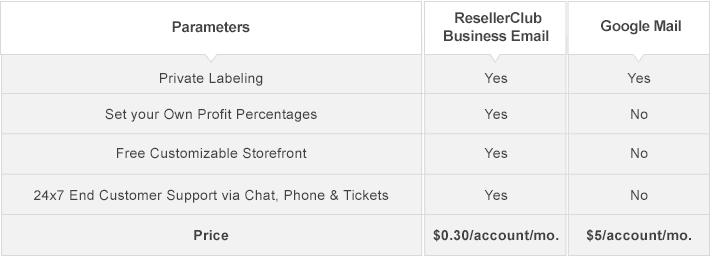
Business Email allows you to offer your customers a robust new email product on the OX7 platform which is Open-Source, Cloud based and comes loaded with a set of productivity tools. Billing at a per account level also offers more flexibility as every email account is independent of other email accounts. Our Business Email is competitively priced too. Refer to the table below to find out how our Business Email stacks up against competition:
Use our White-Labeled Marketing Kit and get started with selling Business Email right away!
Use our White-Labeled Marketing Kit and get started with selling Business Email right away!
Updates to Free Emails with Website Builder & Domains
All new Free email activations associated with Website Builder and Domain Names will be on the new OX platform. All existing orders will also be migrated to the new platform over the next few months. The plan parameters and sending limits will not change and will continue to remain the same on the new interface.
Important - Modifying your Storefront/Billing System
We will be making a number of SuperSite & API Changes to integrate Business Email with our Platform. Please make note of the changes applicable to you based on the selling Platform you use to integrate our products.
SuperSite Users
Please refer to our this link for the list of SuperSite Changes.
API Users
Please refer to our knowledgebase for the list of API Changes.
WHMCS Users
ResellerClub Mods has launched a brand new module for WHMCS users that is completely compatible with our Business Email plans. It can be easily managed with ResellerClub's Advanced Email Management Interface. If you resell our products using WHMCS, you can purchase these modules here to seamlessly sell our Business Email.
If you require more information about this email, please feel free to get in touch with us.
Regards,
Team ResellerClub
SuperSite Users
Please refer to our this link for the list of SuperSite Changes.
API Users
Please refer to our knowledgebase for the list of API Changes.
WHMCS Users
ResellerClub Mods has launched a brand new module for WHMCS users that is completely compatible with our Business Email plans. It can be easily managed with ResellerClub's Advanced Email Management Interface. If you resell our products using WHMCS, you can purchase these modules here to seamlessly sell our Business Email.
If you require more information about this email, please feel free to get in touch with us.
Regards,
Team ResellerClub
Announcements
BLOG & forum
|
Need assistance?
|
Unsubscribe Instructions
You are subscribed to this email announcement because you have signed up with ResellerClub. If you do not wish to receive any further announcements from us you can unsubscribe using the instructions below: 1. Login into your ResellerClub Control Panel 2. Settings > System Notifications > Emails > Set Specific Mail Preferences for myself > Mail Notifications Received from the Control Panel 3. Select the NO radio button from Mail Notifications Received from the Control Panel under General Mail |
 |